How Long Do Live Scans Take? 2026 Results & Appointment Timeline
If you’re staring at a job offer waiting for a background check to clear, or you’re an HR manager trying to plan an onboarding date, the uncertainty of ‘how long does this actually take?’ is genuinely stressful. The good news is that modern Live Scan technology has made the process significantly faster than it used to be, but the timeline still depends on several factors that most applicants don’t know about.
This guide breaks down every stage of the Live Scan process in plain English: from the 15 minutes you’ll spend in the appointment chair to the backend review queues at the DOJ and FBI that most people never hear about. By the end, you’ll know exactly what to expect, what can slow things down, and how to give yourself the best shot at the fastest possible result.
What Is the Average Wait Time for Live Scan Results?
The short answer: most people see results within 3 to 7 business days. But that number doesn’t tell the full story. Depending on whether your check routes through the California DOJ, the FBI, or both, and whether anything in your record triggers a manual review, the actual timeline can range from a single business day to 30 days or more.
DOJ (State) vs. FBI (Federal) Processing Speeds in 2026
When you submit a Live Scan, your fingerprints don’t go to just one place. Depending on the type of license or job you’re applying for, they may route to the California DOJ only, the FBI only, or both simultaneously. Each has its own processing timeline.
| Method | Processing Time | Notes |
| DOJ (State Live Scan) | 1-7 business days | Most CA applicants |
| FBI (Federal Live Scan) | 24-72 | Federal roles, national check |
| Ink-Card (Traditional) | 2-4 weeks | No digital transmission |
The DOJ checks your fingerprints against California’s state criminal database and maintains records for offenses that occurred within the state. The FBI, by contrast, runs a national check using its Integrated Automated Fingerprint Identification System (IAFIS), which covers records from all 50 states and federal courts.
A surprising fact that catches many applicants off guard: the FBI’s federal check is often faster than the state DOJ check. Federal processing typically returns results in 24 to 72 hours. The DOJ’s 1 to 7 business day window exists because of higher submission volume and the additional steps required for California-specific case management.
Ink-card fingerprinting, the old method where an officer rolls your fingers in ink on a physical card, still exists but is increasingly rare. That paper card must be physically mailed to Sacramento, manually processed, and entered into the system by hand. The result is a 2 to 4 week wait that makes Live Scan’s digital transmission look like a miracle by comparison.
Why Some Background Checks Clear in 48 Hours?
This is the question almost no one explains properly, and it’s the one that matters most when you’re in the waiting period.
The BCIA, the Bureau of Criminal Information and Analysis, which sits inside the California DOJ, processes all incoming Live Scan submissions. When your fingerprints arrive, the system compares them against the state’s criminal records database. If no match is found and your prints are clean and legible, your check is flagged as ‘no record’ and sent to the requesting agency almost immediately. That’s the 48-hour scenario.
The 30-day scenario happens when the system flags your submission for human review. This is called entering the Manual Review Queue, and it’s triggered by specific conditions that have nothing to do with guilt or innocence. We’ll cover those conditions in detail in the delay section below, but knowing the queue exists is the first step to understanding your timeline.
Tip: If you submitted your Live Scan more than 7 business days ago and still have no results, your file has almost certainly entered manual review. This is common and does not mean your record has any issue.
How Long Does a Live Scan Appointment Actually Take?
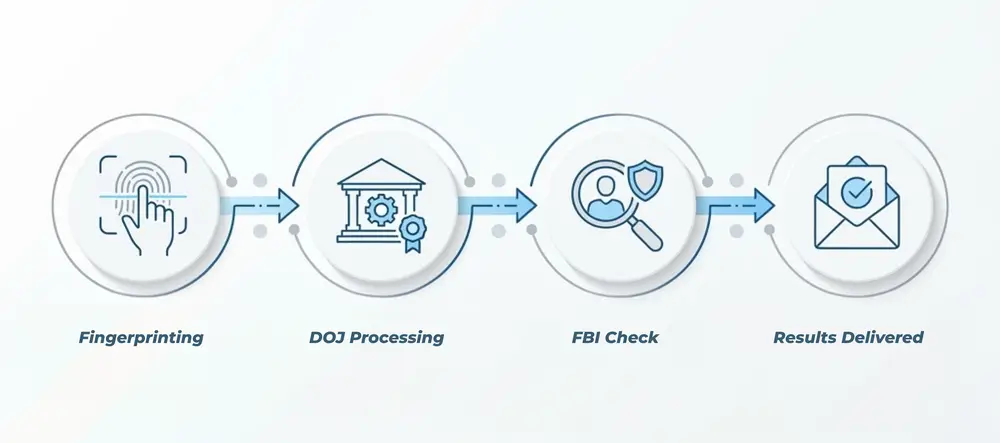
This is where two different timelines get conflated, which causes a lot of unnecessary confusion. The appointment itself, the physical time you spend at the Live Scan location, is short. The wait for results to reach your employer is an entirely separate clock.
The 15-Minute Process
From the moment you sit down at a Live Scan station, the entire process typically takes 10 to 15 minutes. Here’s what happens in that window:
ID Verification
The operator checks your government-issued ID (driver’s license, passport, or state ID) and confirms you match the Applicant Submission Form (ASF) provided by your employer or licensing agency.
Form Review
The operator verifies that the ORI (Originating Agency Identifier) code on your form is correct. This code tells the system exactly where to send your results.
Digital Rolling
Your fingers are pressed against a glass platen connected to a high-definition scanner. The software captures all 10 fingerprints digitally, checking each one for ridge clarity in real time.
Quality Check
The system flags any fingerprints that don’t meet minimum resolution standards. If a finger is flagged, you re-roll immediately, this is normal and adds only a minute or two.
Electronic Transmission
Once all prints are accepted, the file is encrypted and transmitted directly to the DOJ and/or FBI within seconds. Your appointment is done.
You’ll receive a receipt before you leave. On that receipt is your ATI number, the Automated Transaction Identifier, which is the only tool you have for tracking your submission status online. Do not lose this receipt.
Can You Speed Up the Physical Fingerprinting Process?
Yes, within limits. The operator controls the pace of the scan, and good equipment helps, but the single biggest factor you control is the condition of your fingertips on appointment day. Arriving with clean, dry-but-hydrated hands produces better quality images on the first pass, eliminating the need for re-rolls.
Beyond skin prep (covered in detail in the preparation section below), there’s no rush option, no priority lane, and no way to ‘skip the queue’ at the DOJ or FBI level. The fastest appointments are simply the ones where the operator captures clean prints on the first attempt for every finger.
Why Is My Live Scan Status Still ‘In Progress’?
If you’ve checked your status and the portal shows ‘In Progress’ or the results simply haven’t arrived at your employer within the standard window, your file has likely been routed to manual review. This is the most common cause of extended timelines, and it happens for reasons that are entirely administrative, not because there’s a problem with your record.
The California DOJ’s automated system is designed to process the majority of checks instantly. But certain data patterns trigger a flag that pauses automatic processing and sends the file to a human reviewer. These flags are not rare, they happen to thousands of applicants every week.
The ‘Common Name’ Lag: How System Hits Slow Down Results
When your name is submitted, the DOJ system searches its database for potential record matches. If you have a common name, think Michael Johnson, Maria Garcia, or David Lee, the system may return dozens of partial matches from the state database. It can’t automatically confirm which records belong to you and which belong to someone else who shares your name.
In that case, the system escalates to a human reviewer, who manually compares your fingerprints against each matching record to confirm or exclude them. This process can add anywhere from a few extra days to 3 additional weeks to your timeline, depending on how many name matches exist and how deep the reviewer must go.
This is why Live Scan is more accurate than older name-based background checks — fingerprints are unique identifiers. But that accuracy requires time when ambiguity exists in the database.
Fingerprint Quality Rejections: How Dry Skin and Hand Sanitizer Impact Speed
The BCIA 8020 system, the software that evaluates incoming fingerprint images, has strict minimum standards for ridge clarity. If your fingerprints don’t meet those standards, they’re flagged as poor quality and your submission is either rejected entirely or sent for re-rolling.
The most common causes of quality rejections include dry or cracked skin, especially in colder months, excessive calluses from manual labor or sports, cuts or abrasions across the fingerprint ridges, residue from hand sanitizer or lotion that creates a slick surface on the scanner glass, and naturally faint ridges that some people develop with age.
If your prints are rejected after submission, your employer or licensing agency is notified, and you’ll need to schedule a new appointment. That restarts the clock entirely, which is why fingerprint preparation before your appointment is worth taking seriously.
How New California Mandates Are Impacting DOJ Backlogs
California Senate Bill 160, which expanded the scope of background check requirements for certain healthcare, education, and childcare licensing categories, has added measurable volume to DOJ processing queues in 2026. Industry compliance officers have noted processing windows stretching toward the outer edge of the standard 7-business-day range in the first half of the year, particularly for applicants in affected sectors.
If you’re applying for a healthcare license, a teaching credential, or a childcare facility position in 2026, build your hiring timeline with the full 7-business-day window as your baseline expectation rather than assuming a 48-hour clearance.
How to Check Your Live Scan Status Online
California gives applicants one official way to track their background check: the DOJ Applicant Status Check portal. It’s a simple tool, but knowing how to use it correctly saves a lot of frustration.
Step-by-Step Guide to the California DOJ Applicant Status Portal
To check your status, navigate to the official California DOJ website at oag.ca.gov and locate the Applicant Background Check Status section. You’ll need two pieces of information: your ATI number and your date of birth, which the system uses to verify your identity.
Once you enter those details, the portal will return one of four statuses:
- ‘Transmitted to DOJ’: Your fingerprints have been received and are in the processing queue. No action needed.
- ‘In Process’: Your file is under active review. This can mean automated processing or manual review, the portal doesn’t distinguish between the two.
- ‘Completed’: The DOJ has finished its review and transmitted results to the requesting agency. Note: ‘Completed’ does not mean cleared. It means the DOJ’s portion of the process is done.
- ‘Rejected’: Your fingerprints did not meet quality standards. You’ll need to reschedule and re-submit.
The portal updates once per day, typically overnight. If your status hasn’t changed in several days and the standard window has passed, contact your employer or the licensing agency directly, they have access to a more detailed case view than you do as the applicant.
Where to Find Your ATI Number
Your ATI number, the Automated Transaction Identifier, is printed on the receipt your Live Scan operator gave you at the end of your appointment. It’s typically a 10-digit number that begins with your submission date in MMDDYY format.
If you’ve lost your receipt, your Live Scan provider should be able to look up your submission in their records using your name and the date of your appointment. Contact them directly. Do not assume the number is somewhere in an email, most Live Scan providers issue paper receipts only.
What to Do if the DOJ Says ‘Completed’ but Your Employer Has No Record
This is one of the most stressful scenarios applicants face, and it has a specific cause. ‘Completed’ on the DOJ portal means the DOJ transmitted the results to the requesting agency, but the requesting agency could be a licensing board, a state department, or an employer portal that processes incoming results on its own timeline.
If your employer’s HR system shows nothing received, the first step is to confirm that the ORI code on your original submission form pointed to the correct receiving agency. An incorrect ORI sends results to the wrong entity entirely, and correcting it requires a new submission.
If the ORI was correct, ask your employer to check their inbox with the specific DOJ transmission format, sometimes results sit in a secondary queue inside HR software before being flagged as received. In rare cases, a follow-up request directly to the DOJ through your employer’s account is required to retransmit.
How to Ensure Your Live Scan Is Processed as Fast as Possible
You can’t control the DOJ’s processing queue or the FBI’s review timeline. But you can control the quality of the fingerprints you submit, and that single variable has more impact on your personal timeline than any other factor.
The 24-Hour Preparation Protocol
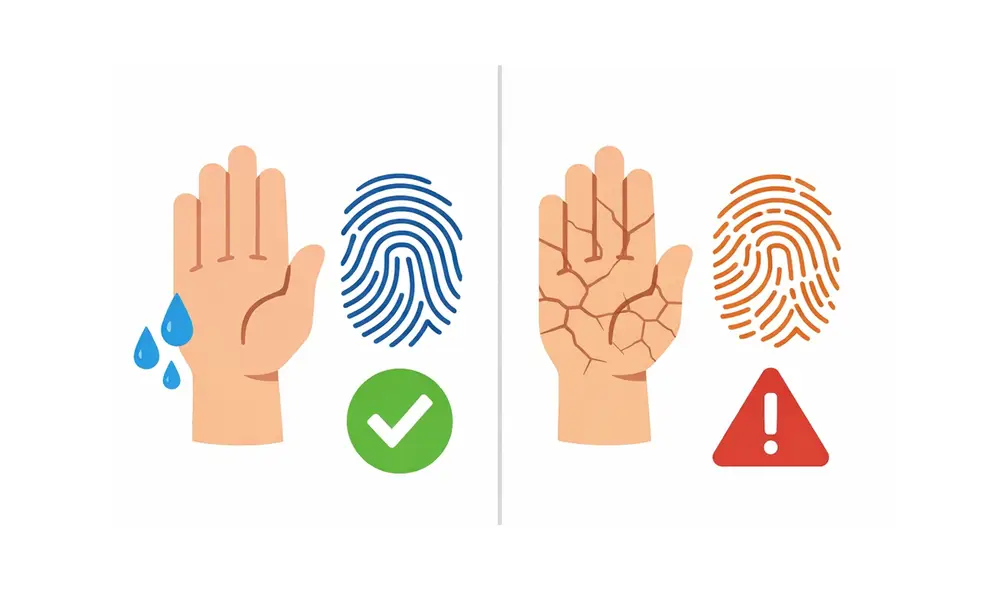
The 24 hours before your Live Scan appointment are more important than most people realize. Here’s a practical preparation routine that gives your fingerprints the best possible chance of clearing on the first submission:
- Drink more water than usual in the 24 hours before your appointment. Dehydrated skin produces flat, faint ridges that scanners struggle to capture clearly.
- Apply a light, non-greasy hand lotion the night before, not the morning of. You want your skin plump and hydrated, not slick. Oily residue on the scanner is a common rejection cause.
- Avoid hand sanitizer for at least 2 hours before your appointment. Alcohol-based sanitizers dry out the skin and leave a chemical residue that disrupts scanner contact.
- Activities that cause calluses, cuts, or swelling can significantly affect fingerprint legibility. If you work with your hands, wear gloves for the 24 hours before your scan if possible.
- Cold hands mean reduced blood flow, which flattens fingerprint ridges. Warm your hands by rubbing them together or running warm water over them for 2 minutes before your appointment.
Not all Live Scan equipment is equal. California DOJ-certified Live Scan providers are required to use equipment that meets minimum resolution standards, but there’s meaningful variation between older standard-definition scanners and newer HD-certified systems.
Additionally, choose a provider with high submission volume. Experienced operators have processed thousands of difficult prints and know the re-rolling techniques that improve image quality for challenging hands. A first-time operator at a low-volume location is more likely to submit borderline prints that eventually get flagged.
Frequently Asked Questions
How long does a Live Scan appointment take?
The physical fingerprinting process takes 10 to 15 minutes from the moment you walk in. ID verification, form review, and digital rolling are all completed in that window.
When will my employer receive the results?
Most employers receive results within 3 to 7 business days. If your record is clear, it could arrive within 24 to 72 hours via the FBI channel or 48 hours via the DOJ.
Why is my Live Scan taking longer than a week?
Delays beyond a week typically mean your file has entered manual review. This can happen due to a common name match, rejected fingerprints, or a pre-1945 birth year that requires paper-based cross-referencing.
Where can I check my Live Scan status?
Visit the California DOJ Applicant Status Check portal at oag.ca.gov. You’ll need your ATI number from your Live Scan receipt to look up your results.
What is an ATI Number and where is it located?
ATI stands for Automated Transaction Identifier. It’s a unique tracking number printed on the receipt your Live Scan provider gives you at the end of your appointment.
Why was my Live Scan rejected for ‘Poor Quality’?
Poor fingerprint quality is usually caused by dry skin, calluses, cuts, or residue from hand sanitizer. The BCIA 8020 system flags prints that don’t meet minimum ridge clarity standards, triggering a re-roll or rejection.
Can I pay an extra fee to expedite my background check?
There is no official fee-based expedite option for DOJ or FBI Live Scan processing. Timelines are determined by queue volume and the complexity of your record review, not by payment tier.